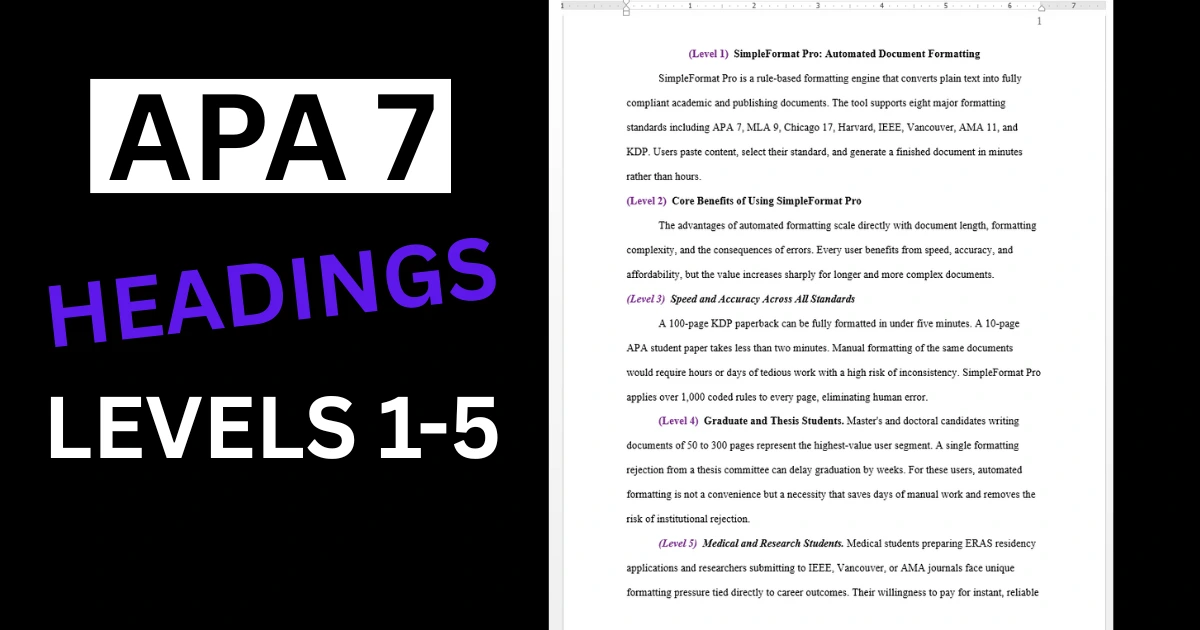
APA 7 headings use a five-level system to organize content. Getting the APA 7 format right for headings is one of the most common struggles in any APA 7 student paper format — and one of the first things professors check. Whether you're looking at an APA 7 sample paper or trying to figure out heading levels on your own, here's everything you need to know.
The Five APA 7 Heading Levels: APA 7 Format Example
According to the APA Manual 7th Edition (Section 2.27, Table 2.3), here are the five APA 7 headings levels and their formatting:
- Level 1: Centered, Bold, Title Case
- Level 2: Flush Left, Bold, Title Case
- Level 3: Flush Left, Bold Italic, Title Case
- Level 4: Indented 0.5", Bold, Title Case, ending with a period. Text continues on the same line.
- Level 5: Indented 0.5", Bold Italic, Title Case, ending with a period. Text continues on the same line.
Understanding Run-In Headings
Levels 4 and 5 are "run-in" headings—meaning the paragraph text continues on the same line after the heading. This is different from Levels 1-3, where text begins on the next line.
Example of a Level 4 heading:
Participant Selection. The study recruited 150 undergraduate students from...
Common APA 7 Headings Mistakes to Avoid
- Using all caps: APA 7 format uses Title Case, never ALL CAPS for headings
- Adding extra formatting: Don't underline APA 7 headings or change font sizes
- Skipping levels: If you use Level 3, you must have used Levels 1 and 2 first
- Forgetting the period: Levels 4 and 5 require a period at the end
When to Use Each APA 7 Heading Level
Most APA 7 student paper formats only need Levels 1 and 2. Longer papers like theses and dissertations typically use Levels 1-3, and only complex documents with deeply nested sections need all five levels. If you're unsure, check any APA 7 sample paper in your discipline to see how heading levels are used in practice.
Ready to Format Your Document?
Stop fighting with margins and headings. Get a perfectly formatted paper in minutes.
Try SimpleFormat Pro Free →Let Software Handle APA 7 Headings Format
Instead of learning how to format APA 7 in Word for each heading level, let SimpleFormat Pro apply the correct APA 7 format automatically. Just mark your headings in the wizard, and the output will have perfect APA 7 headings — no APA 7 template needed.